
2 September 2026
What Should Rebar Detailing Software Automate? A Practical Checklist for AutoCAD and BricsCAD Offices
A practical checklist for rebar detailing software in AutoCAD and BricsCAD: updates, schedule traceability, DWG compatibility, and pilot tests.
- rebar detailing
- AutoCAD
- BricsCAD
Good rebar detailing software should keep reinforcement geometry, references, annotations, position marks, and schedules tied to the same object data when geometry changes. It should not replace structural design judgment or promise one-click, construction-ready reinforcement from analysis results. For AutoCAD and BricsCAD offices, test update behavior, schedule traceability, DWG/version compatibility, standards control, and manual review after revision.
What is the difference between reinforcement design and rebar detailing?
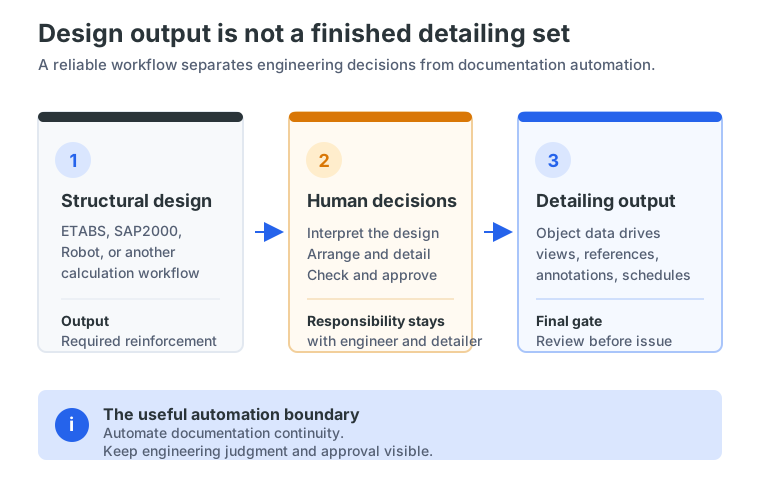
Structural design determines required reinforcement and verifies the member against applicable rules. Engineers may use ETABS, SAP2000, Autodesk Robot, or another calculation workflow. The result still needs interpretation, detailing, checking, and approval.
Rebar detailing turns an approved arrangement into coordinated drawings and schedules: geometry, spacing, diameters, bends, hooks, POS marks, annotations, quantities, and issue documentation. Autodesk describes Revit reinforcement as numbered objects matched in schedules and tags. That illustrates data continuity, not automated design decisions.
A detailing tool should make documentation traceable without hiding responsibility. It is not a structural-analysis solver, a replacement for ETABS or SAP2000, or a one-click route from analysis output to construction-ready reinforcement. The engineer and detailer still interpret, check, and approve the issue.
For a small or mid-size DACH office, ask what the software automates, what data it consumes, and what the engineer must still decide. “Rebar detailing software AutoCAD” often hides this practical question. The test also applies when comparing reinforcement detailing software with a full BIM workflow.
What should update when a beam, slab, wall, or footing changes?
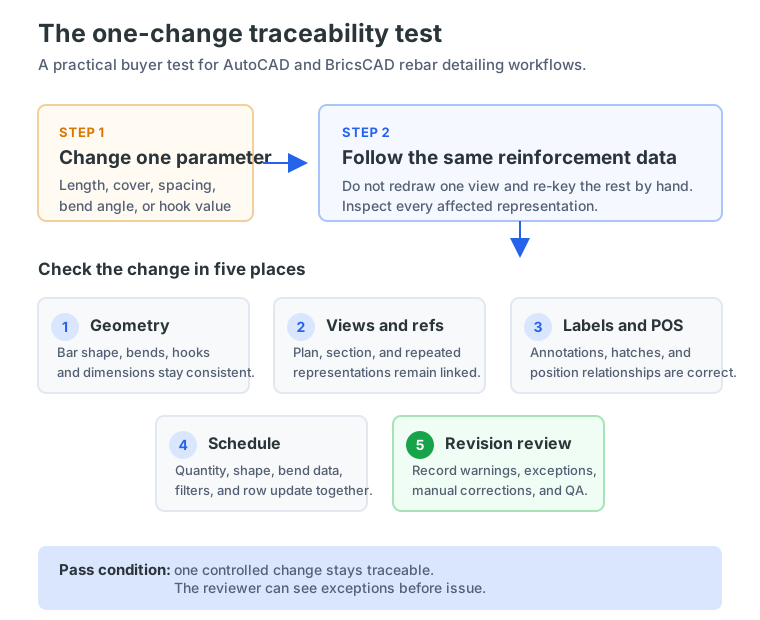
The central test for AutoCAD rebar detailing software is not whether it has an “automatic BBS” button. The test is whether one controlled geometry change can be followed through every affected representation and output.
In AutoCAD or BricsCAD, take a beam, slab, wall, or footing from a representative project. Change one meaningful parameter: a length, cover, bar spacing, section dimension, bend angle, or hook-related value. Then check the following in order:
- Does the bar geometry reflect the change?
- Do bend dimensions and shape information remain consistent with the modeled bar?
- Do the plan and section references show the same bar data?
- Do labels, hatches, and annotations update or clearly flag the affected item?
- Does the POS mark or reference relationship remain correct?
- Does the bending schedule regenerate from the changed reinforcement data?
- Can the reviewer see what changed before the revised package is issued?
SBeXpress documents object-based reinforcement workflows in AutoCAD, including editable rebar geometry, references, labels, position handling, and schedule objects. Its public material describes geometry changes updating plans and bar schedules, while the intelligent-object documentation describes propagation from a main specimen to its references. Inspect those behaviors on your own DWG; they are not reasons to skip project QA.
Are intelligent rebar objects better than lines, blocks, or dynamic blocks?
Editable linework is not automatically reinforcement data. A polyline can represent a bar, and a dynamic block can expose attributes or parameters. Both can be useful in AutoCAD. Ask whether the object also retains the information needed for coordination and scheduling.
For AutoCAD rebar detailing, a useful object has persistent identity and properties such as diameter, spacing, bend data, material, position, quantity, and office attributes. A plan, section reference, label, and schedule row should derive from that same source.
SBeXpress describes reinforcement elements as special AutoCAD objects with object-specific editing, property-based labels, positioning, references, styles, filtered schedules, and table templates. A change can therefore be made to the reinforcement object rather than redrawing disconnected lines and re-keying a schedule.
This is a traceability question, not a verdict that blocks are useless. Ask the vendor to edit a main representation and inspect references, positions, exceptions, and the schedule; changing visible geometry alone is not schedule automation.
“DWG-native” means more than opening a file. Check templates, layers, title blocks, plotting, styles, archives, and what recipients see without the same application. Confirm current AutoCAD and BricsCAD versions with the vendor, rather than relying on an old table. This is also the core check for BricsCAD rebar detailing.
See how Intelligent Objects work before comparing feature lists. The useful question is how the objects behave during a real revision.
How should a buyer test schedule traceability?
A bar bending schedule is only as reliable as its connection to the reinforcement it describes. “Schedule generation” may mean a live table, a filtered report, or a separate export requiring reconciliation. A bar bending schedule software trial should make that lineage visible: this is rebar schedule automation worth testing.
Use this five-step test with a real or representative drawing:
- Choose one bar and record its starting state. Note the member, diameter, spacing, shape, position mark, references, and schedule row. Include a bar with a bend or hook rather than testing only a straight bar.
- Change one geometry parameter. Make the change specific and repeatable. A beam length, slab edge, bar spacing, or bend-related value is more informative than moving a line by eye.
- Follow the change through the drawing. Inspect the plan, section, labels, POS/reference data, repeated representations, and any hatches or frames that should remain coordinated.
- Refresh or regenerate the schedule. Confirm that the row comes from the same reinforcement data. Check quantity, shape, bend or hook dimensions, filtering, and any frozen or issued state.
- Review the revision as an engineer would. Record warnings, manual corrections, exceptions, and the time needed to check and issue the revised package.
SBeXpress documents position collection, positioning rules, filtered schedules, table templates, and PDF output. Autodesk Revit connects reinforcement numbering with schedules and tags, while SOFiCAD describes detailing, office styles, and direct schedule generation. Apply the same test across tools; these workflows are not identical.
If your office follows a national or project-specific convention, test those fields directly. BS 8666:2020 is a current UK reference for scheduling, dimensioning, bending, and cutting, not a universal German, Austrian, or Swiss requirement. Apply the relevant requirements and verify the output with the engineer and fabricator.
What should AutoCAD and BricsCAD offices compare before switching tools?
Platform and archive fit. Confirm current AutoCAD or BricsCAD releases, Windows requirements, object behavior, and DWG exchange. Open archived files, not only a clean demo. Check what external recipients can view and use.
Office standards. Test layers, lineweights, colors, units, text hierarchy, labels, POS numbering, title blocks, plotting, language, and table templates. The Torquato Tasso Munich case study shows why inherited drawing language matters: the tool must fit issued appearance, not only create valid bars.
Scope and modules. Identify what is included for rebar, mesh, formwork, tables, BIM exchange, and other workflows. Do not assume every module is included; ask what the pilot needs and what is outside scope.
Competitor continuity. SOFiCAD is active and has current AutoCAD-related documentation. Bricsys’ Application Store lists reinforcement software with intelligent-model and schedule features, but includes older version information. Verify current support instead of comparing copied text.
For an AutoCAD or BricsCAD office, choose the tool whose object behavior, standards, platform support, and review process match your drawings and responsibilities—not necessarily the longest feature list.
How can a small office run a defensible pilot?
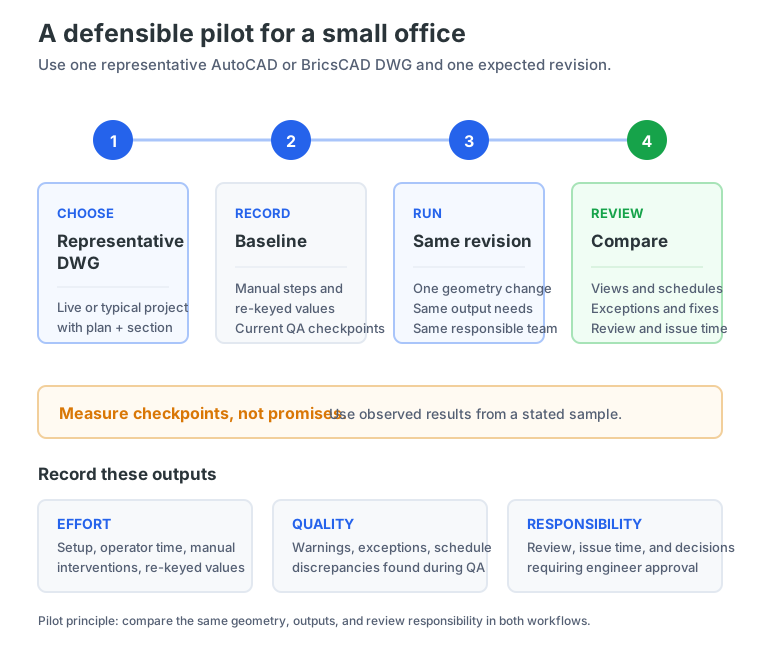
A small AutoCAD or BricsCAD office can test fit without a full migration. Choose one live or representative DWG with an expected revision and a repeated representation, such as plan plus section.
Record the AutoCAD or BricsCAD baseline: data source, manual drawing steps, re-entered values, schedule method, and pre-issue QA. Then run the same geometry change and output requirements in the candidate tool.
Measure checkpoints rather than promising a percentage saving:
- setup and configuration effort;
- operator time at each workflow stage;
- manual interventions and re-keyed values;
- warnings and unresolved exceptions;
- schedule-versus-plan discrepancies found during QA;
- time required to review and issue the revision;
- decisions that still required engineer or detailer approval.
The Pilzgasse Vienna case study describes 45 apartments, more than 200 plan sheets, and multiple revisions. Its workflow emphasizes object data, stable bar marking, schedules from detailing data, change propagation, and pre-issue QA. Treat it as an example, not an audited benchmark.
What is the lowest-risk next step?
Start with the one-change traceability test. A suitable rebar detailing software workflow should keep the bar, its references, annotations, POS data, and schedule connected while leaving design decisions and approval with the engineer. It should also fit the office’s AutoCAD or BricsCAD environment, DWG archive, standards, and review process.
SBeXpress is positioned for reinforcement planning and detailing in AutoCAD and BricsCAD, with a current public 30-day trial flow that allows offices to test the full product on their own drawings without a credit card or commitment. Confirm current platform compatibility and the modules you need before starting.
Start with SBeXpress: Start your free 30-day trial and run the checklist on one representative project. If your office wants context on the intended workflow, see the rebar detailing workflow for engineering offices before evaluating the result.
Frequently asked questions
What should rebar detailing software automate?
SBeXpress and comparable tools should connect geometry with references, annotations, POS marks, quantities, and bending schedules so controlled changes can be checked. They should support documentation without replacing design judgment.
Can rebar detailing software design reinforcement from ETABS or SAP2000?
Analysis and detailing are different stages. A detailing tool may document engineer-supplied data, but a buyer should not assume it produces approved, construction-ready reinforcement from ETABS or SAP2000 results.
What should I test before choosing AutoCAD rebar detailing software?
Change one real bar or member parameter and follow it through geometry, views, annotations, POS/reference data, quantities, and the bending schedule. Also test CAD versions, DWG exchange, office standards, and revision visibility.
Are intelligent rebar objects better than lines or blocks?
Only when they retain reinforcement data and keep AutoCAD representations traceable. Editable linework alone does not prove that bar identity, bend information, quantities, and schedule output remain connected.
What should a small office measure in a rebar-software pilot?
Record setup effort, manual interventions, exceptions, schedule corrections, checking time, and review results on one representative project. Use observed checkpoints and a stated sample, not a fixed percentage saving.
References
- Autodesk (2025). Rebar numbering for schedules and annotation in Revit. https://help.autodesk.com/cloudhelp/2025/ENU/Revit-StructEng/files/GUID-6AC222F6-CDE0-4572-8A26-7E0250D2DD5D.htm
- Autodesk. Revit rebar bending schedules. https://www.autodesk.com/learn/ondemand/curated/aec-collection-quick-start-guide-for-structural-design-and-engineering/2DNg8aE2awPQTSPhS0g5Lt
- BSI (2020). BS 8666 scheduling, dimensioning, bending and cutting. https://knowledge.bsigroup.com/products/scheduling-dimensioning-bending-and-cutting-of-steel-reinforcement-for-concrete-specification-1
- Bricsys. IMPACT Reinforcement listing. https://boa.bricsys.com/applications/a/?app=1397&apploc=2417
- MüllerProg. SBeXpress Features and Intelligent Objects. https://smartbim.hu/en/features and https://smartbim.hu/en/features/intelligent-objects
- MüllerProg. SBeXpress Engineers and Free Trial pages. https://smartbim.hu/en/for-engineers and https://smartbim.hu/en/order-trial
- MüllerProg. Pilzgasse Vienna case study. https://smartbim.hu/files/pdf/case_study_pilzgasse_en.pdf
- MüllerProg. Torquato Tasso Munich case study. https://smartbim.hu/files/pdf/case_study_torquato_tasso_en.pdf
- SOFiSTiK. SOFiCAD page and 2026 notes. https://www.sofistik.com/en/products/bim-cad/soficad and https://docs.sofistik.com/2026/en/soficad/whatsnew.html