
16 September 2026
Should a DWG-Centric Office Move to Revit for Rebar Detailing? A Migration Decision Framework
Should a DWG-centric office move to Revit for rebar detailing? Compare transfer, rebuild effort, standards, schedules, and a low-risk pilot.
- rebar detailing
- AutoCAD
- Revit
Moving a DWG-centric reinforcement office from AutoCAD or BricsCAD to Revit is a workflow migration, not a file conversion. A linked DWG can provide reference content, while Revit's reinforcement workflow uses numbered elements, tags, and schedules. Decide by piloting one representative project and recording what transfers, what must be rebuilt, and where human review remains.
Is moving from AutoCAD or BricsCAD to Revit a migration or a redraw?
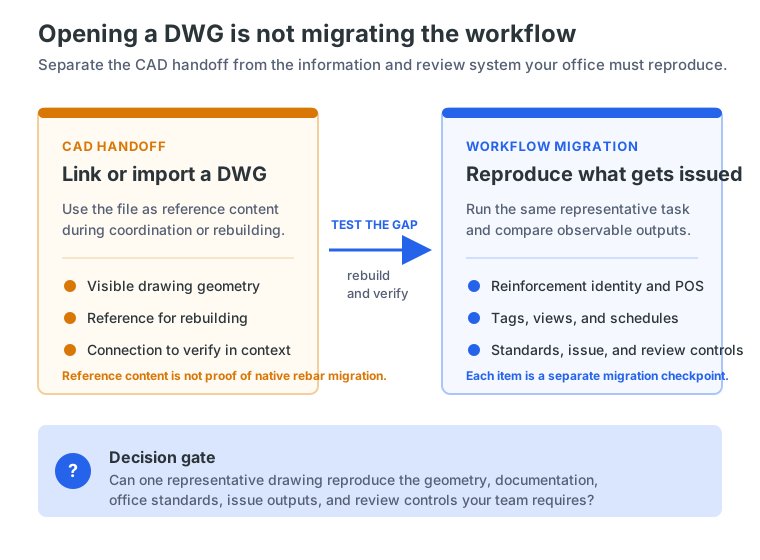
For AutoCAD to Revit rebar detailing, the first question is not “Can Revit open this DWG?” It is “What must the office reproduce after the file is opened?” Those are different tests.
Autodesk distinguishes linking a CAD file from importing it: linking is used when the connection between the CAD file and the Revit model should be maintained. A DWG can therefore serve as reference content during coordination or rebuilding. It does not, by itself, establish that reinforcement identity, native model objects, tags, schedules, office standards, or issue controls have migrated. That last point is an inference from the two workflows, not a claim that Autodesk publishes a universal DWG conversion rule.
For a DWG to Revit structural detailing pilot, inventory geometry, reinforcement identity and POS conventions, styles and title blocks, labels and schedules, and revision and review records separately. A file that looks correct on screen may still leave the office rebuilding the information structure behind it.
What actually changes in a Revit reinforcement workflow?
Revit reinforcement documentation is built around model elements rather than only disconnected 2D linework. Autodesk’s Revit 2025 documentation says reinforcement elements are numbered on placement and matched for schedules and tags. Rebar numbers can be scheduled, counted, and tagged. Test whether one approved reinforcement identity feeds the required views and lists.
This does not mean every output is automatic. Someone still configures the project, places or edits reinforcement, checks shape and cover, resolves exceptions, and approves the issue. Autodesk documents numbering, schedules, and tags; it does not promise your office’s standards or a construction-ready package.
The practical change is larger than learning commands: detailers may need model, view, numbering, and rule skills; BIM coordinators may govern exchanges; engineers and reviewers still own design, checking, and approval. Assign those responsibilities explicitly.
What should a DWG-centric office audit before choosing a platform?
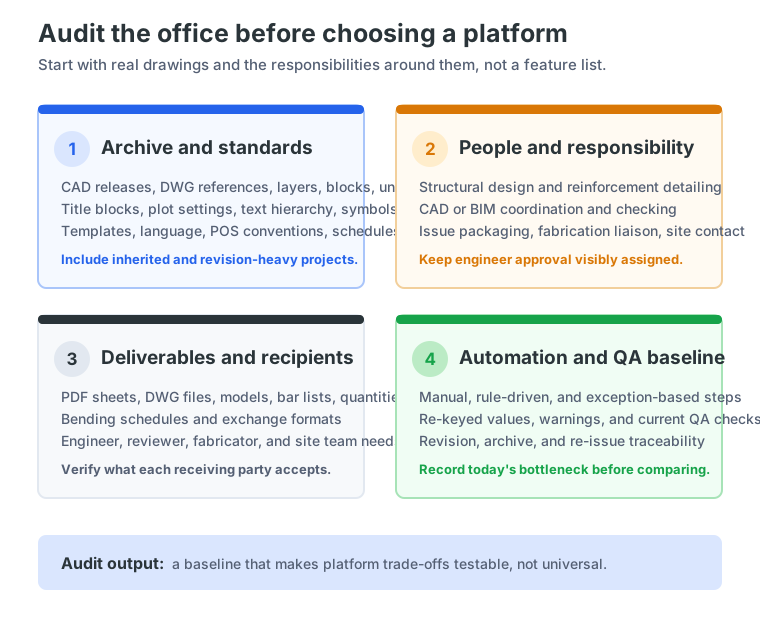
Start with the archive, not a vendor demonstration. Select several real projects, including one clean recent drawing and one inherited or revision-heavy project, then record the standards the office actually depends on.
Archive and standards
List the CAD releases, DWG references, external files, layers, blocks, lineweights, units, title blocks, plot settings, text hierarchy, symbols, templates, language conventions, POS rules, schedule layouts, and recurring exceptions.
The Torquato-Tasso Munich case study shows why this audit matters. The project had been started by another office, so the team reviewed inherited layers, symbols, text hierarchy, title blocks, and plotted-sheet appearance. It configured reusable styles and templates, created pilot sheets, and performed visual checks before issue. This documents one workflow, not a universal migration requirement.
Roles, learning, and deliverables
Write down who handles structural design, reinforcement detailing, CAD or BIM coordination, checking, issue packaging, fabrication liaison, and site communication. Then identify what changes under each candidate workflow.
Learning may include reinforcement modeling, views, numbering, schedules, project standards, model governance, and review—not just software navigation. Treat the required training as a pilot observation, not a universal duration or productivity claim.
Ask what the engineer, reviewer, fabricator, and site team receive: PDF sheets, DWG files, models, bar lists, schedules, quantities, or exchange formats. A BIM rebar workflow may support coordination, but accepted deliverables still need verification.
Project and national requirements remain project-governed. Do not describe Revit, AutoCAD, BricsCAD, or a reinforcement add-on as universal code compliance.
How do you compare the same reinforcement task in AutoCAD/BricsCAD and Revit?
Do not compare feature lists. Compare one representative task under the same requirements: a beam with stirrups, wall, slab, footing, or staircase detail with repetition and an expected revision.
Record the baseline in AutoCAD or BricsCAD, then repeat the task in Revit. Ask the same questions in both environments:
- How much setup is required before the first bar can be documented?
- How are reinforcement identity, bar marks, references, labels, and views created?
- What happens when the geometry or spacing changes?
- Which quantities and schedule fields update, and which require manual correction?
- Can the office reproduce its title block, plotting, text hierarchy, and schedule layout?
- What reaches the reviewer, fabricator, and site team as the final issue package?
- Which steps are automatic, rule-driven, manual, exception-based, or engineer-approved?
- How can the reviewer see and verify the revision before issue?
This is the useful meaning of “AutoCAD vs Revit rebar”: a controlled comparison of the work your office actually sells and issues, not a universal ranking. Record observations instead of turning a demonstration into a promise.
What is the smallest defensible migration pilot?
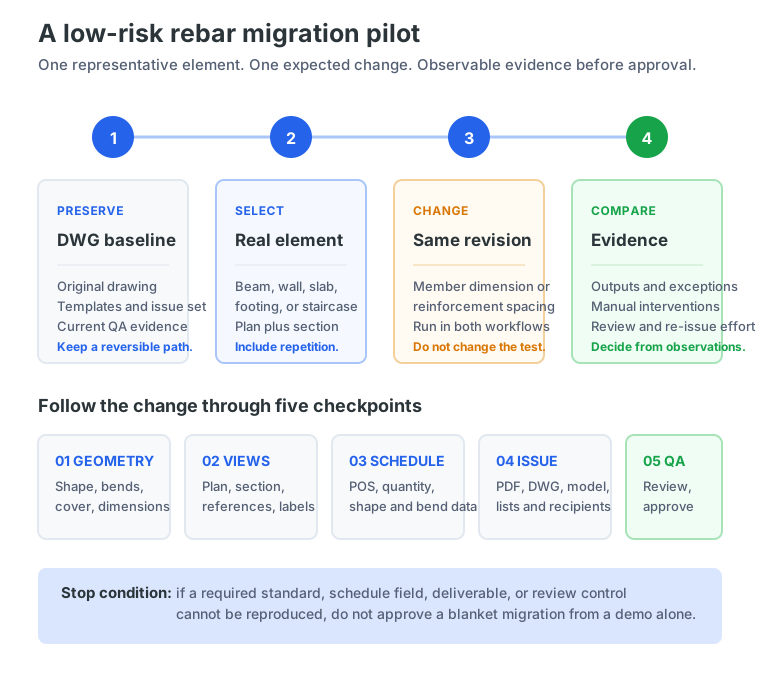
A low-risk pilot should be small enough to reverse and complex enough to expose the real decision. Preserve the original DWG, templates, and issued baseline. Select one representative project element with an expected revision and a repeated representation, such as a plan plus section.
Run one controlled change through both candidate workflows. Change a member dimension or reinforcement spacing, then follow the result through geometry, views, references, labels, position data, quantities, schedules, archive or export, and the review package.
Record:
- setup and template or family configuration;
- supervised training and support required;
- automatic, rule-driven, manual, and engineer-approved steps;
- interventions and exceptions after the change;
- geometry, bend or shape, cover, label, POS, quantity, and schedule checks;
- PDF, DWG, model, and list outputs for actual recipients;
- revision and archive traceability;
- QA findings, re-issue effort, and stakeholder feedback.
Set the stop condition before starting. If the candidate cannot reproduce a required office standard, schedule field, deliverable, or review control, do not approve a blanket migration on the strength of a demonstration. This is editorial guidance for testing transfer and responsibility, not a measured benchmark.
The Pilzgasse 28 Vienna case study shows why revision and schedule checks belong in the test. It documents a large, revision-heavy plan set using SBeXpress rebar objects, bar-marking rules, schedules from detailing data, linked-object propagation, and pre-issue consistency checks. It does not compare the workflow with Revit or establish a percentage saving.
When should an office keep DWG and add reinforcement intelligence instead?
A full platform move is not automatically the right answer. If the primary problem is model coordination, a Revit-centered process may deserve a serious pilot. If the problem is repetitive reinforcement detailing, schedule traceability, archive continuity, or inconsistent 2D updates, a DWG-native reinforcement workflow may address it with less change. That is a conditional decision, not a universal product verdict.
SOFiCAD’s official page positions its 2D AutoCAD-based workflow for construction and reinforcement detailing, including office-standard styles and direct schedule generation. SOFiSTiK presents a separate Revit-centered path that derives 2D sheets, lists, bending schedules, and cut lists from a 3D reinforcement model. Bricsys positions BricsCAD BIM as a DWG-based platform that can move between 2D and 3D. These pages describe offerings; fit remains unproven.
SBeXpress is another DWG-native option to test when the need is reinforcement planning and detailing inside AutoCAD or BricsCAD. Its current Intelligent Objects documentation describes editable rebar, references, and position properties, while its BIM Tools page documents model-related CAD tools and IFC import/export. The reviewed sources do not establish direct exchange of native Revit reinforcement models, so SBeXpress should not be presented as a Revit import/export replacement.
The right question is whether the office needs model coordination, detailing automation, archive continuity, or all three.
What questions should a vendor answer before migration approval?
Ask each candidate vendor for written, current answers:
- Which exact AutoCAD, BricsCAD, and Revit versions are supported?
- What transfers from a live archive, and what must be recreated?
- How are numbering, POS data, schedule fields, styles, templates, and revisions controlled?
- What happens to references, annotations, title blocks, plotting, and exchange formats?
- Which outputs can engineers, fabricators, reviewers, and site teams use?
- What training and technical support are included?
- Where does engineering responsibility remain after updates?
Ask for a pilot using your own drawings, not only a prepared demonstration. Record undocumented version, exchange, or schedule behavior as unresolved.
What is the lowest-risk next step?
Do not approve an office-wide move because a DWG opened successfully or a model looked coordinated in a demonstration. Run the one-change test on one representative project, preserve the current DWG path, and compare transfer, rebuild effort, standards, schedules, issue outputs, training, and review responsibility.
If the audit shows that the office needs reinforcement intelligence while keeping its DWG-centric environment, see how SBeXpress Intelligent Objects work. SBeXpress’s engineering page describes a full-product 30-day free trial, use on the office’s own drawings, no commitment, and technical support during onboarding. Confirm current compatibility and module scope before relying on the result.
After the checklist is defined, Start your free 30-day trial and test one representative drawing. Treat the trial as evidence gathering, not a promise that one platform is right for every project.
Frequently asked questions
Can I convert AutoCAD rebar drawings directly into Revit?
Treat a DWG link or import as reference, not proof that native reinforcement migrated. Test geometry, identity, standards, tags, schedules, revisions, and review controls separately.
What is the difference between linking a DWG and migrating reinforcement detailing?
Linking maintains a CAD-file connection for reference in Revit. Migration also requires repeatable creation, identification, documentation, scheduling, issue, and review. Confirm behavior in the selected version.
Is Revit better than AutoCAD for rebar detailing?
It depends on coordination needs, archive, standards, staff capability, and deliverables. Compare one representative task and record revision, schedule, output, training, and review results.
Can a DWG-native reinforcement workflow be a valid alternative to full platform migration?
It can be a candidate when the need is detailing automation and DWG continuity rather than full model coordination. Compare verified capabilities and deliverables against the office’s bottleneck; neither path is universally correct.
References
- Autodesk (2024). About linking CAD files in Revit. https://help.autodesk.com/view/RVT/2024/ENU/?guid=GUID-B69ED66A-4272-4332-9872-FD802DA1C9E7
- Autodesk (2025). Rebar numbering for schedules and tags in Revit. https://help.autodesk.com/cloudhelp/2025/ENU/Revit-StructEng/files/GUID-6AC222F6-CDE0-4572-8A26-7E0250D2DD5D.htm
- Bricsys. BricsCAD BIM. https://www.bricsys.com/en-us/bricscad/bim
- MüllerProg. SBeXpress BIM Tools. https://smartbim.hu/en/features/tools/bim
- MüllerProg. SBeXpress Intelligent Objects. https://smartbim.hu/en/features/intelligent-objects
- MüllerProg. SBeXpress for engineers and free trial. https://smartbim.hu/en/for-engineers and https://smartbim.hu/en/order-trial
- MüllerProg. Pilzgasse 28 Vienna case study. https://smartbim.hu/files/pdf/case_study_pilzgasse_en.pdf
- MüllerProg. Torquato-Tasso Munich case study. https://smartbim.hu/files/pdf/case_study_torquato_tasso_en.pdf
- SOFiSTiK. SOFiCAD. https://www.sofistik.com/en/products/bim-cad/soficad
- SOFiSTiK. SOFiSTiK Reinforcement. https://www.sofistik.com/en/products/bim-cad/reinforcement